Aligned Text with lc_center_* and lc_right_*
lc_center_ and lc_right_ are ID prefixes for SVG <text> elements that need center or right horizontal alignment at runtime. By default, SVG text is left-aligned. These prefixes tell Cast’s player to reposition the text so it stays visually anchored where the designer intended.
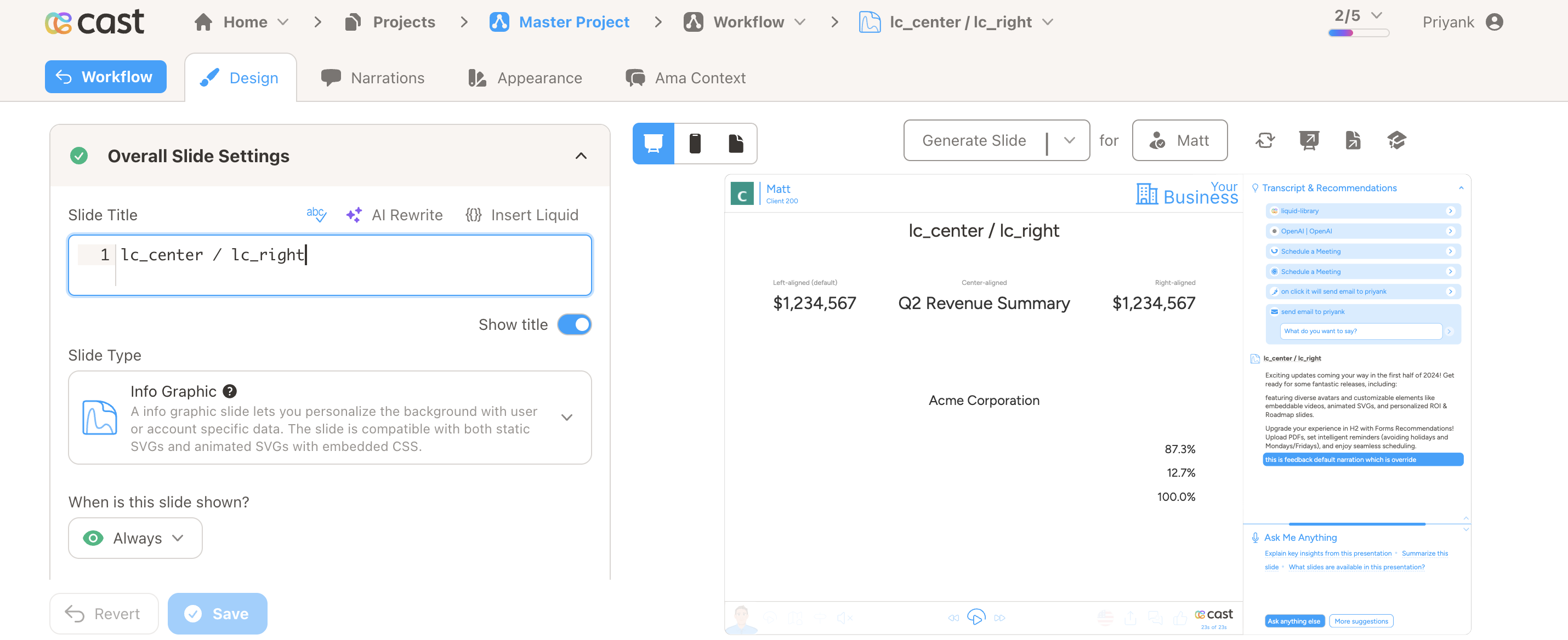
| Prefix / ID pattern | Alignment | SVG text-anchor |
|---|---|---|
lc_center_* | Center-aligned | middle |
lc_right_* | Right-aligned | end |
lc_* | Left-aligned (default) | start |
Key Features
- Automatic Anchor Calculation: The player measures the placeholder text width and computes the correct anchor point before the slide renders
- No Extra Data Needed: The text value is supplied through normal SVG variable override — alignment is controlled entirely by the ID prefix
- Graceful Fallback: If the anchor cannot be computed, the text remains left-aligned
Element Identification
The target element must be a <text> with an ID that starts with one of:
lc_center_*for center-aligned textlc_right_*for right-aligned textlc_*for left-aligned text (default)
lc_left_* is not a required prefix. Use regular lc_* IDs for left alignment.
Input Format
Plain text string — the same value you would use for any SVG text variable:
"Your dynamic text here"
No special JSON or formatting is required. The alignment is determined entirely by the element ID prefix, not by the data.
Important Notes:
- The placeholder text in Figma must match the alignment of the
lc_variant used:lc_center_*→ center-aligned in Figma,lc_right_*→ right-aligned in Figma - The player computes the anchor point from the placeholder’s bounding box — if the Figma alignment does not match the prefix, the text will appear misaligned at runtime
Compatibility: Works with <text> elements only
| Scenario | Default <text> | lc_center_* | lc_right_* |
|---|---|---|---|
| Short value | Left edge ✓ | Centered ✓ | Right edge ✓ |
| Long value | Extends right | Extends both sides | Extends left |
| Alignment stability | Anchored left | Anchored center | Anchored right |
| Desired alignment | Recommended ID pattern | Example ID |
|---|---|---|
| Left | lc_* | lc_left_text |
| Center | lc_center_* | lc_center_text |
| Right | lc_right_* | lc_right_text |
Example Usage
Example 1: Center-Aligned Heading
Element ID: lc_center_title
"Q2 Revenue Summary"
The text is centered around the midpoint of the original placeholder bounding box, regardless of the new text length.
Example 2: Right-Aligned Currency
Element ID: lc_right_amount
"$1,234,567"
The text is right-aligned to the right edge of the original placeholder bounding box — numbers line up neatly even when values vary in length.
Example 3: Center-Aligned Recipient Name
Element ID: lc_center_name
"Acme Corporation"
The company name is centered in the designated area, whether the name is short or long.
Example 4: Right-Aligned Percentage
Element ID: lc_right_pct
"87.3%"
The percentage aligns flush-right, keeping columnar data visually consistent.