
Document Types
Document Types
Section titled “Document Types”Knowledge Base supports four different document creation methods, each optimized for different content sources and use cases.
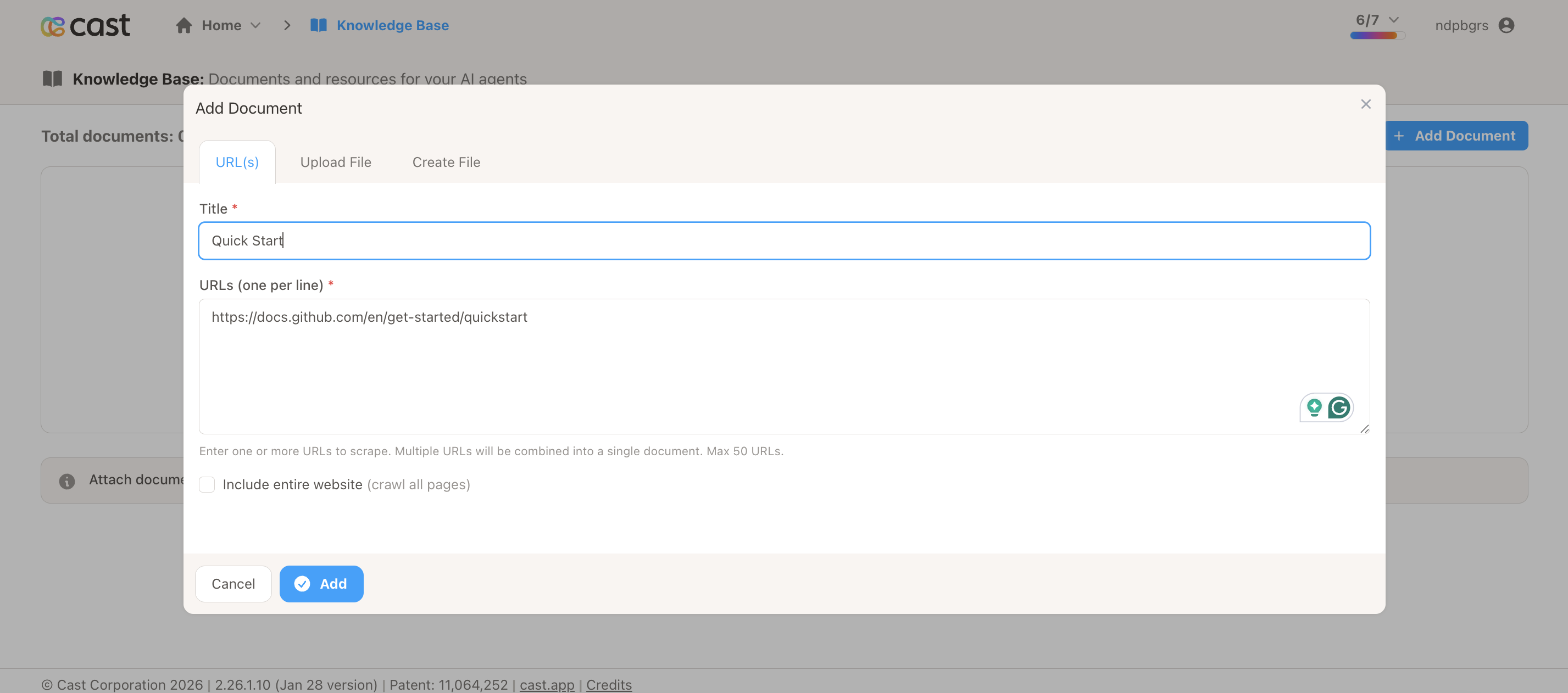
Single URL Scraping
Section titled “Single URL Scraping”Extract content from a specific webpage.
When to Use
Section titled “When to Use”- Documentation pages
- Blog posts and articles
- Product pages
- FAQ pages
- Single-page content
How It Works
Section titled “How It Works”- You provide a URL
- System scrapes the page content
- Content is processed and stored
- Document is uploaded to AI platform
Best Practices
Section titled “Best Practices”- Use publicly accessible URLs (no login required)
- Choose pages with well-structured text content
- Verify the URL loads properly in a browser first
- Single focused pages work better than homepage aggregations
Processing Time
Section titled “Processing Time”30-60 seconds on average
Examples
Section titled “Examples”Good URLs to use:
https://docs.github.com/en/get-started/quickstarthttps://www.paulgraham.com/startupideas.htmlhttps://en.wikipedia.org/wiki/Artificial_intelligence
Limitations
Section titled “Limitations”- URL must be publicly accessible
- Pages behind authentication will fail
- Heavy JavaScript pages may not scrape completely
- Images and videos are not processed
Website Crawling
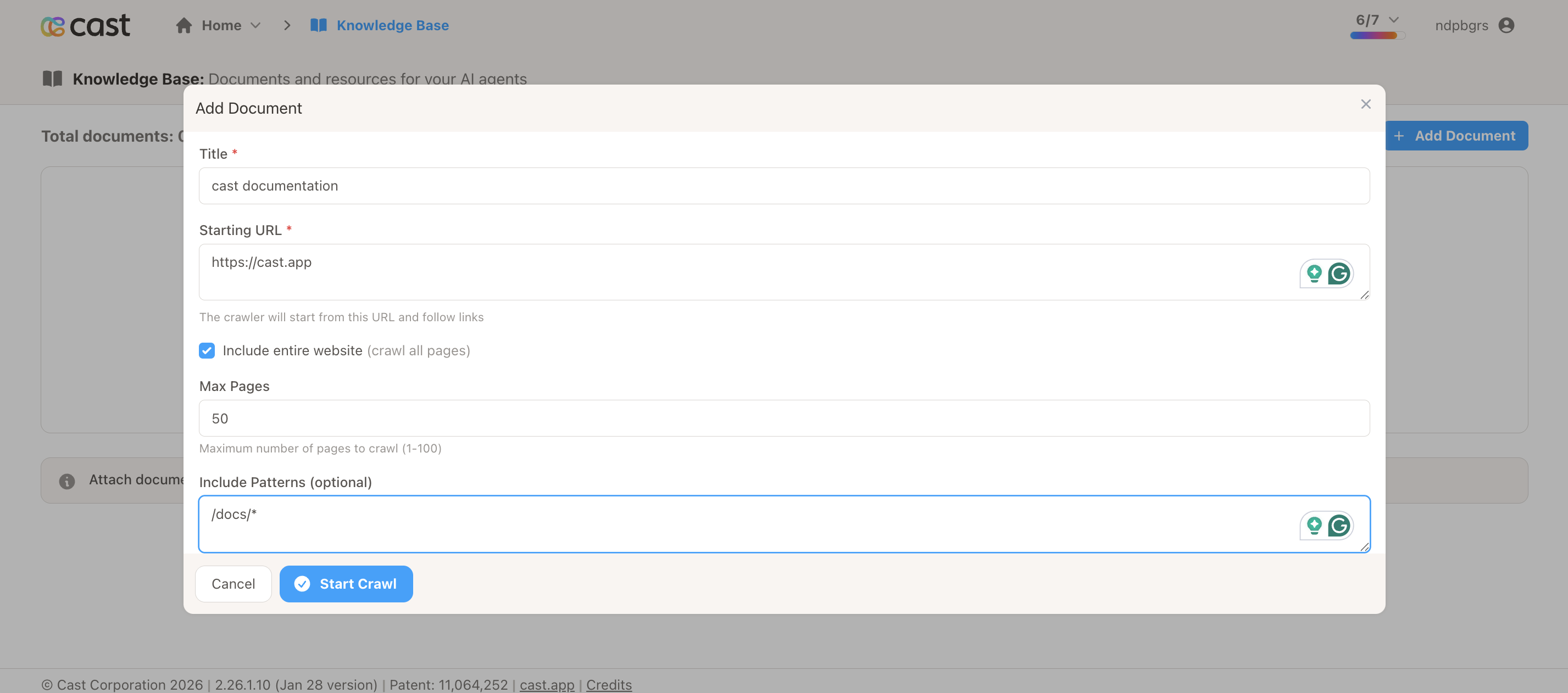
Section titled “Website Crawling”Scrape multiple pages from a website and combine into one knowledge document.
When to Use
Section titled “When to Use”- Documentation sites with multiple pages
- Blog archives
- Multi-page guides
- Knowledge base sites with related content
How It Works
Section titled “How It Works”- You provide a base URL and crawl settings
- System discovers and visits related pages
- All page content is combined into one document
- Document is uploaded to AI platform
Configuration Options
Section titled “Configuration Options”Base URL
The starting point for the crawl (e.g., https://docs.yourcompany.com)
Max Pages
Limit the number of pages to crawl (1-100). Start with 5-10 for testing.
Include Patterns (Optional)
Pages to include using wildcards:
/docs/*- Include all pages in docs folder/guides/*- Include all pages in guides folder/*.html- Include all HTML files
Exclude Patterns (Optional)
Pages to skip:
/api/*- Skip API reference pages/changelog/*- Skip changelog pages*.pdf- Skip PDF files
Best Practices
Section titled “Best Practices”- Start with small max_pages (5-10) to test patterns
- Use include/exclude patterns to avoid irrelevant content
- Be specific with patterns to save processing time
- Consider breaking large sites into multiple focused crawls
Processing Time
Section titled “Processing Time”2-10 minutes depending on page count. Allow 30-120 seconds per page.
Example Configurations
Section titled “Example Configurations”Documentation Site:
Base URL: https://docs.yourcompany.comMax Pages: 20Include: /guides/*, /tutorials/*Exclude: /api/*, /changelog/*, *.pdfBlog Content:
Base URL: https://blog.yourcompany.comMax Pages: 10Include: /posts/*, /articles/*Exclude: /author/*, /category/*Limitations
Section titled “Limitations”- Maximum 100 pages per crawl
- Subject to web scraping service rate limits
- Slower processing for large page counts
- Crawling respects robots.txt
File Upload
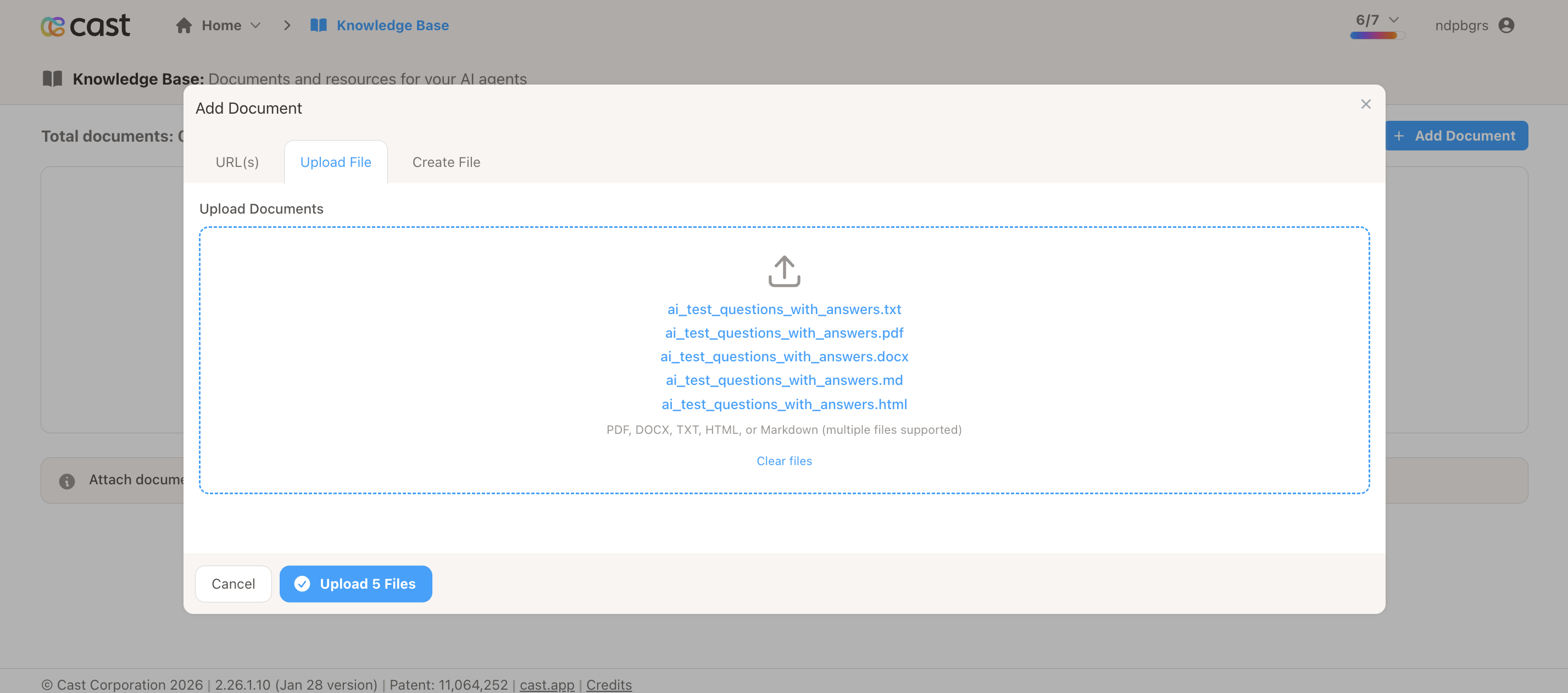
Section titled “File Upload”Upload existing documents from your computer.
When to Use
Section titled “When to Use”- You have existing documentation files
- Content from internal systems
- Formatted documents (PDFs)
- Structured data (CSV, JSON)
Supported File Formats
Section titled “Supported File Formats”- PDF (.pdf) - Formatted documents
- Markdown (.md) - Structured text
- Plain Text (.txt) - Simple text content
- HTML (.html) - Web content
- CSV (.csv) - Tabular data
- JSON (.json) - Structured data
File Size Limit
Section titled “File Size Limit”10 MB maximum per file
Best Practices
Section titled “Best Practices”- Use PDFs for formatted documents
- Use Markdown for structured text content
- Keep files under 5 MB for best performance
- Clean up unnecessary formatting before upload
- Use descriptive filenames
Processing Time
Section titled “Processing Time”5-10 seconds on average
Multiple File Upload
Section titled “Multiple File Upload”You can upload multiple files at once. Each file becomes a separate document in your Knowledge Base.
Limitations
Section titled “Limitations”- 10 MB maximum per file
- Text-based content works best
- Images in PDFs may not be processed
- Scanned PDFs (OCR required) may not work well
Inline Text
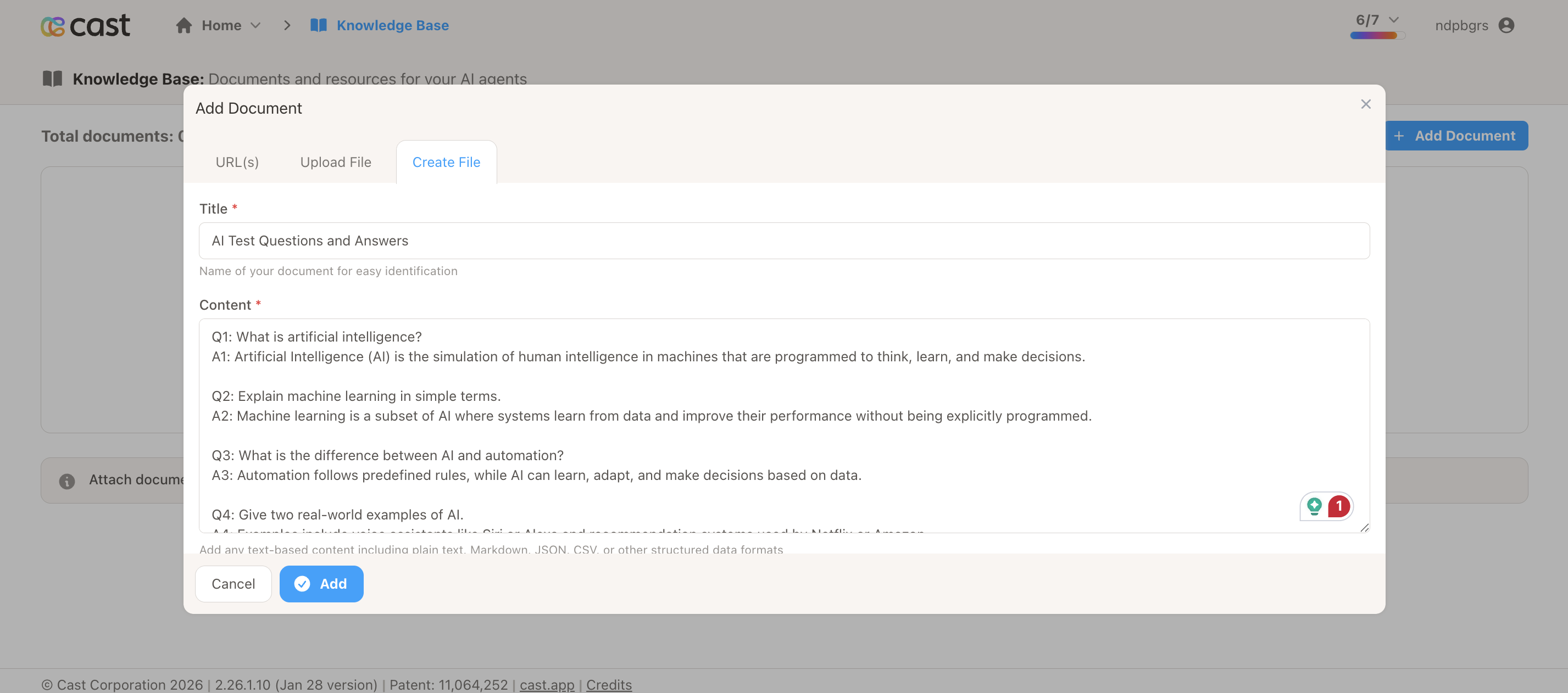
Section titled “Inline Text”Create documents by typing or pasting content directly into the interface.
When to Use
Section titled “When to Use”- Quick FAQs
- Company policies
- Support scripts
- Product information
- Contact details
- Any content you can copy/paste
How It Works
Section titled “How It Works”- You provide a title
- Type or paste content into the text area
- Content is saved as a text file
- Document is uploaded to AI platform
Best Practices
Section titled “Best Practices”- Use clear, descriptive titles
- Format content with line breaks for readability
- Use Q&A format for FAQs
- Break content into logical sections
- Include relevant contact information
Processing Time
Section titled “Processing Time”Less than 5 seconds (fastest method)
Example Content Formats
Section titled “Example Content Formats”FAQ Format:
Q: What are your business hours?A: Monday-Friday, 9 AM - 5 PM EST.
Q: How do I contact support?A: Email support@cast.app or call 1-800-XXX-XXXX.
Policy Format:
PRIVACY POLICY SUMMARY
We collect only necessary user data and never sell personalinformation to third parties. All data is encrypted at restand in transit.
DATA RETENTION- Active accounts: Data retained indefinitely- Deleted accounts: Data purged after 90 days
Product Information:
CAST PLATFORM OVERVIEW
Cast is a video communication platform for creating personalizedcontent at scale.
KEY FEATURES:- Personalized video based on viewer data- Multi-language support (50+ languages)- Real-time analytics and insights- CRM and marketing tool integrations
PRICING:Starter: $49/month - Up to 100 videosProfessional: $199/month - Up to 1,000 videosEnterprise: Custom pricing - Unlimited videos
Limitations
Section titled “Limitations”- Plain text only (rich formatting is stripped)
- Very long text (>1MB) may be slow
- Emojis and special characters are preserved
Comparison Chart
Section titled “Comparison Chart”| Type | Processing Time | Best For | Size Limit |
|---|---|---|---|
| URL | 30-60 sec | Single pages, articles | N/A |
| Crawl | 2-10 min | Multi-page sites | 100 pages |
| File | 5-10 sec | Existing documents | 10 MB |
| Text | < 5 sec | Quick content, FAQs | No limit |
Choosing the Right Type
Section titled “Choosing the Right Type”Use URL when:
- You have a single webpage with good content
- Content is publicly accessible
- You want to be able to refresh content later
Use Crawl when:
- You need content from multiple related pages
- Documentation spans several pages
- You want all related content in one document
Use File when:
- You have existing documents to upload
- Content is in PDF or other supported formats
- You’re migrating from another system
Use Text when:
- You need to create content quickly
- You’re writing FAQs or policies
- You have content to copy/paste from elsewhere
Need Help?
Section titled “Need Help?”- Support: support@cast.app
- Quick Reference: Cheat Sheet
- Troubleshooting: FAQ & Troubleshooting