AMA Context
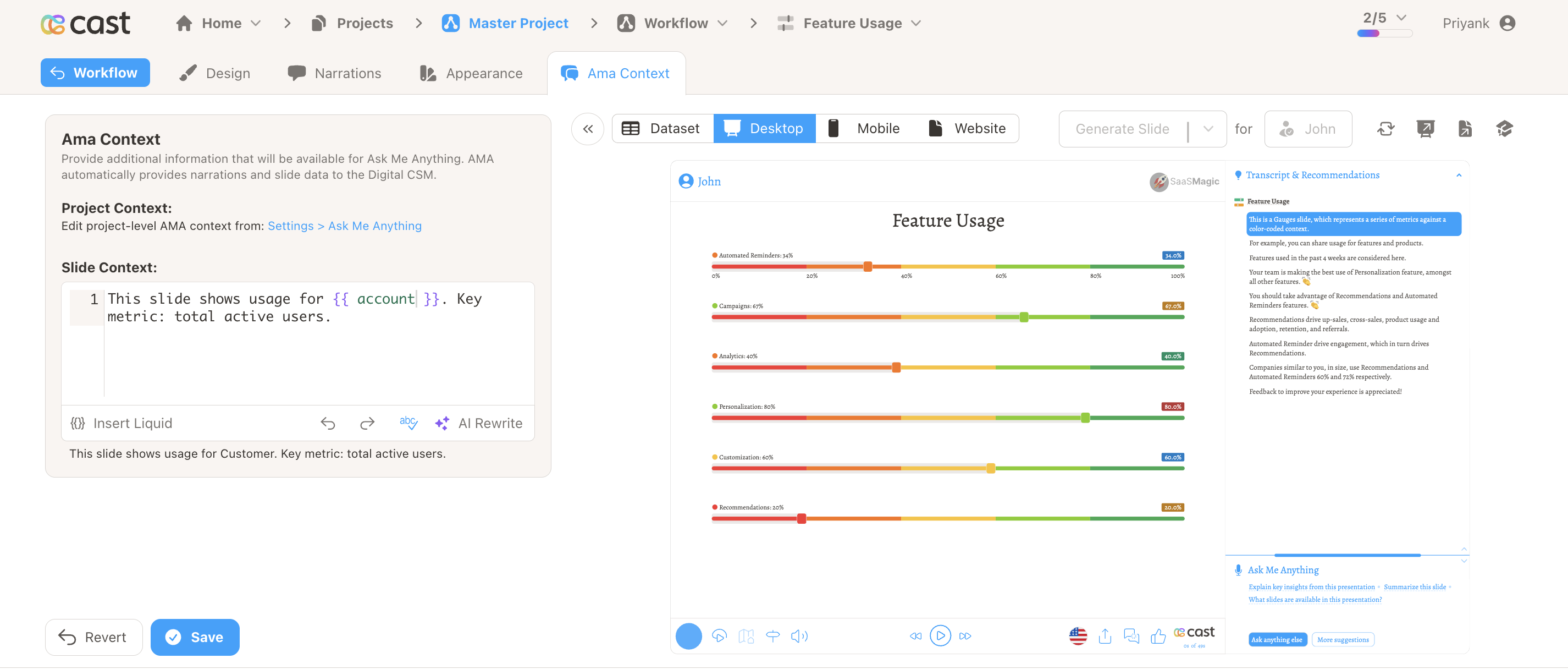
The AMA Context tab lets you provide additional information for the Digital CSM (Ask Me Anything) on this slide. When viewers ask questions about the slide, the Digital CSM uses this context along with narrations and slide data to give better answers.
What AMA Receives Automatically
The Digital CSM automatically has access to:
- Narrations – All narration text (or transcriptions) for the slide
- Slide Data – Chart data, labels, and visualization content
- Project Context – Global AMA context from Settings → Ask Me Anything
Slide Context
Use the Slide Context field to add slide-specific information that the Digital CSM can use when answering questions. Examples:
- Definitions – Explain terms, acronyms, or metrics used on the slide
- Background – Provide context that helps interpret the data
- Key Takeaways – Highlight the main points the slide illustrates
- Caveats – Note limitations or how to interpret the data
Liquid Support
The Slide Context field supports Liquid template variables. Personalize the context per contact:
This slide shows usage for {{ account }}. Key metric: total active users.
Variables, fields, and snippets from the Insert Liquid dropdown are available for auto-completion.
Project-Level AMA Context
Edit project-level AMA context from Settings → Ask Me Anything. Project context applies to all slides and is previewed at the top of the AMA Context tab. Slide context adds to it for the current slide only.
Related
- Slide – Overview of slide editor tabs
- Design – Configure slide content and data
- Narrations – Add voice to your slide
- Appearance – Override slide appearance
- Project Settings – Ask Me Anything and agent personas